
Do you have two sites with a UDM on each with a tunnel between, and wish you could resolve DNS lookup between sites, here is how you can achieve that.
This guide walks you through configuring DNS resolution between two Ubiquiti Dream Machine (UDM) sites connected by a tunnel. Dnsmasq, the built-in DNS server on UDMs, offers powerful options to achieve this.
Challenge: Subdomain and Local Resolution
For this example, we’ll assume the secondary site is configured as a subdomain (ext.home) within the primary domain (.home). This setup introduces a complication: while we want to forward most DNS requests to the other UDM, we also want local machines on the secondary site to be resolved by its local UDM.
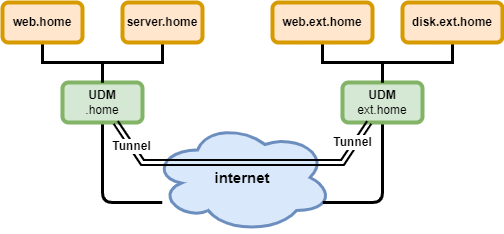
Solution: Leveraging the server parameter
Dnsmasq’s server parameter allows us to specify how to handle DNS requests based on domains. Here’s a breakdown of its syntax:
server=[/[<domain>]/[domain/]][<server>[#<port>]][@<interface>][@<soruce-ip>][@[#<port>]]
/domain/: Matches DNS requests for this domain (e.g.,ext.home)<server>: IP address of the DNS server to forward requests to#: Denotes the UDM itself
Primary UDM Configuration (Simple Forwarding)
For the primary UDM (.home site), we simply add this line:
server=/ext.home/192.168.1.1This instructs Dnsmasq to forward all DNS requests for ext.home to the secondary UDM (IP address 192.168.1.1).
Secondary UDM Configuration (Forwarding with Local Resolution)
The secondary UDM (ext.home site) requires a two-step approach to full these criterias:
- Resolve Local Machines: We’ll configure Dnsmasq to handle DNS resolution for local machines on the secondary site.
- Forward External Requests: We’ll add a similar line to forward all requests except those for
ext.hometo the primary UDM.
Configuration
As mentioned before, we need to tell the secondary UDM (ext.home) to forward all internal DNS requests except those for its own domain (ext.home) to the primary UDM. We can achieve this using the server parameter in Dnsmasq.
Here’s the specific configuration line you need to add:
server=/ext.home/#
server=/*.home/192.168.0.1
Explanation:
# This symbol represents the UDM itself.
*.home collects all request for domain home, except the ones fetch by the previous configuration line.
Now we need to configure the secondary UDM to handle DNS resolution for local machines on the ext.home network. Dnsmasq can handle this functionality itself. You typically don’t need to add any specific lines for this purpose, but it’s important to understand how it works.
By default, Dnsmasq automatically manages and resolves hostnames for devices on the same network it’s running on. So, any devices connected to the secondary UDM’s local network (ext.home) will have their DNS requests resolved by the secondary UDM itself. This ensures proper resolution for local machines within the secondary UDM’s site.
Implementation example
If you already created the customized script explain in the previous post, you can just extend it with the bold text. If you have not read previous post read it and the below gets more understandable…
Primary UDM file (my_dns_fix)
#!/bin/bash

cat <<EOT >/run/dnsmasq.conf.d/my_fwd_rule.conf
server=/ext.home/192.168.1.1
EOT

pkill -9 dnsmasq
Secondary UDM file (my_dns_fix)
#!/bin/bash

cat <<EOT >/run/dnsmasq.conf.d/my_fwd_rule.conf
server=/ext.home/#
server=/*.home/192.168.1.1
EOT

pkill -9 dnsmasq